Planificando una Aplicación de Cuestionario
Need to decide whether/where to integrate pause all stuff lost with optionalization of mandala design and also to update debugging page. --MF, 7/5/19
• In most of the other labs (the established ones anyways), there are prompts to "Save As:" with a recommended name for the project. In the new Quiz Lab, I don't see any of those prompts, nor do I see any "Now is a good time to save your work". Could you add those in? I teach my course online, and use those as guides to let my students know which projects to submit. (Looks good by the way) --MF, 7/18/19 (from Joe)
En esta página, tú empezaras a desarrolllar una aplicación para cuestionarios mediante la creación de un tipo de datos abstracto para emparejar las preguntas con sus respuestas.
 Decide what type of quiz you would like to build, and write three to five questions and their correct answers.
 Read the following section, clicking all the links and carefully reading all the code as you go...
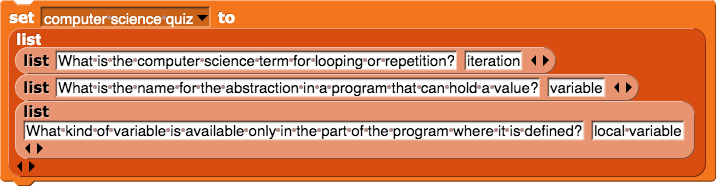
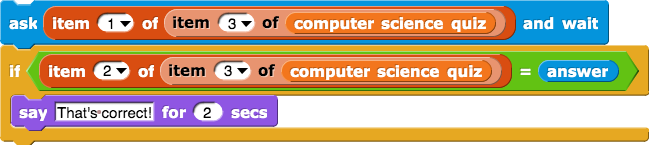
You'll use a list to store your quiz items in a variable. You could just put all the questions and their answers in a list like this and then use  to retrieve each question and each answer using its index.
That might be ok for the first quiz item (you could use  to get the first question and
  to get the first answer), but for a long quiz, you might leave out one answer by accident and then after that, the program will get questions and answers mixed up.
:
Sublist
A sublist is a list as an item of another list.
Images inside these links need alt/title text. --MF, 7/22/19
Instead, you can use a sublist for each question/answer pair. Then you could choose just one of those lists at a time to work with.
AAP.1.D.3
But with nested lists (lists with sublists) it can be hard to keep track of the input numbers for item of, so a better way is to use abstraction to organize the quiz items.
AAP.1.D.2, AAP.1.D.4
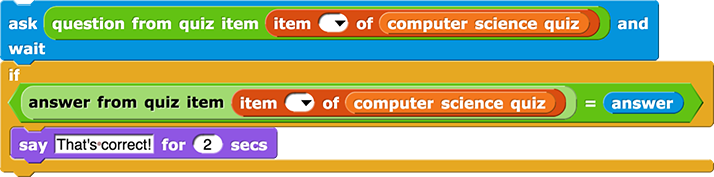
This abstraction just hides the list and item of blocks, so it isn't complicated to build, but it can make your code much easier to write, read, and debug.
Can we please revisit possible ways to abridge or break up the following vocab box? --MF, 8/22/19
-
The
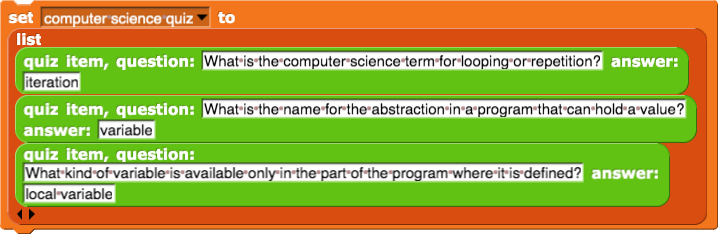
 block is the constructor; it constructs the data structure.
-
The
 and
and  blocks are the selectors; they each select one piece of the data structure.
-
The constructor and selector together implement the
quiz item abstract data type. An abstract data type (or ADT) is a custom data type that's meaningful to your program. It's not built into the language; you develop it as you code. This is an abstraction because it hides the details inside the constructor and selectors so that the programmer who uses a quiz item only has think about questions and answers and not about list indices.
-
A data type is what kind of data something is (number, text string, list, etc.). For example, number is the data type for the first input to
 and list is the the data type for its second input.
-
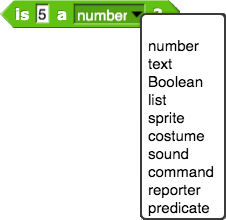
Each programming language provides some primitive data types (data types that are built-in). For example, Snap! provides numbers, text (words and sentences), Booleans (true or false), lists, and some you haven't yet used as data (such as sprites and costumes). This menu shows all of Snap!'s primitive types.
- Data abstraction is the creation and use of abstract data types in a program.
The word "abstract" is often used casually to mean something harder to understand or more complex, but in computer science, its meaning is almost the opposite. ADTs are things that you, the programmer, create to make your program easier for you and others to read, debug, and improve.
The constructor makes it certain that every time you use it, you build the thing in the right order.
I wish we could find a way to combine this with the vocab box above. As it is, first we tell them in white what an ADT is and what its pieces are, then we tell them again in gray, and then we tell them for a
third time in green. -bh
It sounds like that repetition bothers you... I kind of like it. --MF, 7/5/19
- Build the custom
quiz item abstract data type (both the constructor and the two selectors).
Specifying an Input Type
Your selectors expect a quiz item, i.e., a list, as input. You can make your blocks show what type of data they expect. It's not necessary in Snap! but, like assigning a color to a block, it can be a helpful reminder of what the block does and what type of input it expects. You've already seen input slots of several shapes, indicating different expected data types.
In the Block Editor while creating a selector, click on a plus sign to enter an input name. Then...
-
Click on the arrow to the right of the input name:
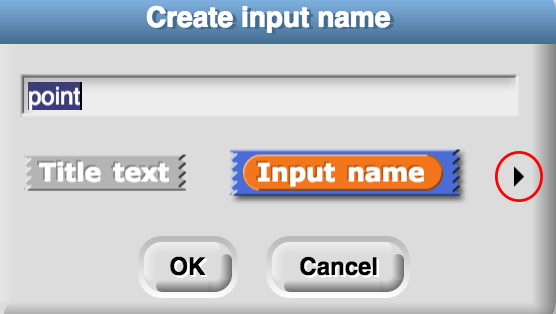
- Choose the data type you want for that input. (For this project, you'll use the "text" and "list" input types.)
- Click OK.
- Create a global variable to store your quiz items and initialize it as a list using your constructor. (Don't type everything again; use copy and paste.)
- Test both the selectors for different items in your list of quiz items, and debug any problems.
-
Imagine you make a variable capitals and use set to give this list of lists a name:

Which of the following statements are true?
Choose all that apply.

reports a
list with two items: "Augusta" and "Maine".
Correct.

reports the word "Augusta".
Correct.

reports the word "Iowa".
No. What is item 2 of "capitals"?

reports the number 8.
No. Each of the small lists is a single item in the list "capitals" .

reports a
list with one item: "Iowa".
Correct.